Skip to content

Software for architectural and design firms

Let clients explore options, comment on designs and sign off online

Design feedback often arrives as an email with six attachments, a photo of a marked-up print and a phone call nobody wrote down. We build configurators where clients explore options within your design rules. We also build portals where clients comment on drawings and approve each phase, and internal tools that track projects, documents and deadlines. Your design software stays; we add what connects it to clients and to the rest of the studio.

  • Configurators that follow your design rules
  • Client comments and approvals per phase
  • Project phases, documents and deadlines together
  • Payments and inquiries straight from the configurator

Why it works.

  • 01

    Your design rules, built into a tool

    A configurator applies the rules your team otherwise explains in every meeting, such as which modules fit together, minimum sizes and what each option costs. Clients explore freely and can’t pick something you can’t build.

    Rules, not slides
  • 02

    Feedback with a paper trail

    Comments, revisions and approvals are tied to a drawing version and a phase, so “who agreed to move the window?” always has an answer.

    Approvals per phase

  • 03

    Fewer hours lost between phases

    Concept, design, permit and construction documents each have their tasks, deadlines and required files. The studio sees what’s late before the client does.

    Project tracking

  • 04

    Start with one tool

    A configurator for one product line, or a client portal for one type of project. Test it with real clients before adding more.

    A small first version

A design phase, from upload to sign-off.

Each phase follows the same loop. The system keeps versions and decisions in order, so the team can spend its time on design.

  1. New version shared The architect publishes drawings for the client to review
  2. Client comments Notes and questions on the drawing, from any device
  3. Change list drafted AI turns comments and meeting notes into a list for the team to check
  4. Every item resolved The phase can’t close while a comment is still open
  5. Client signs off Approval recorded with the version, the date and the name
  6. Next phase opens Tasks, documents and deadlines for the next stage are created
The rule in step four does more than the AI. A phase can’t close with open comments, so nothing agreed in a meeting gets lost.

What we’ve learned.

From the projects we’ve built in this area.

  • 01

    A configurator is only as good as its rules.

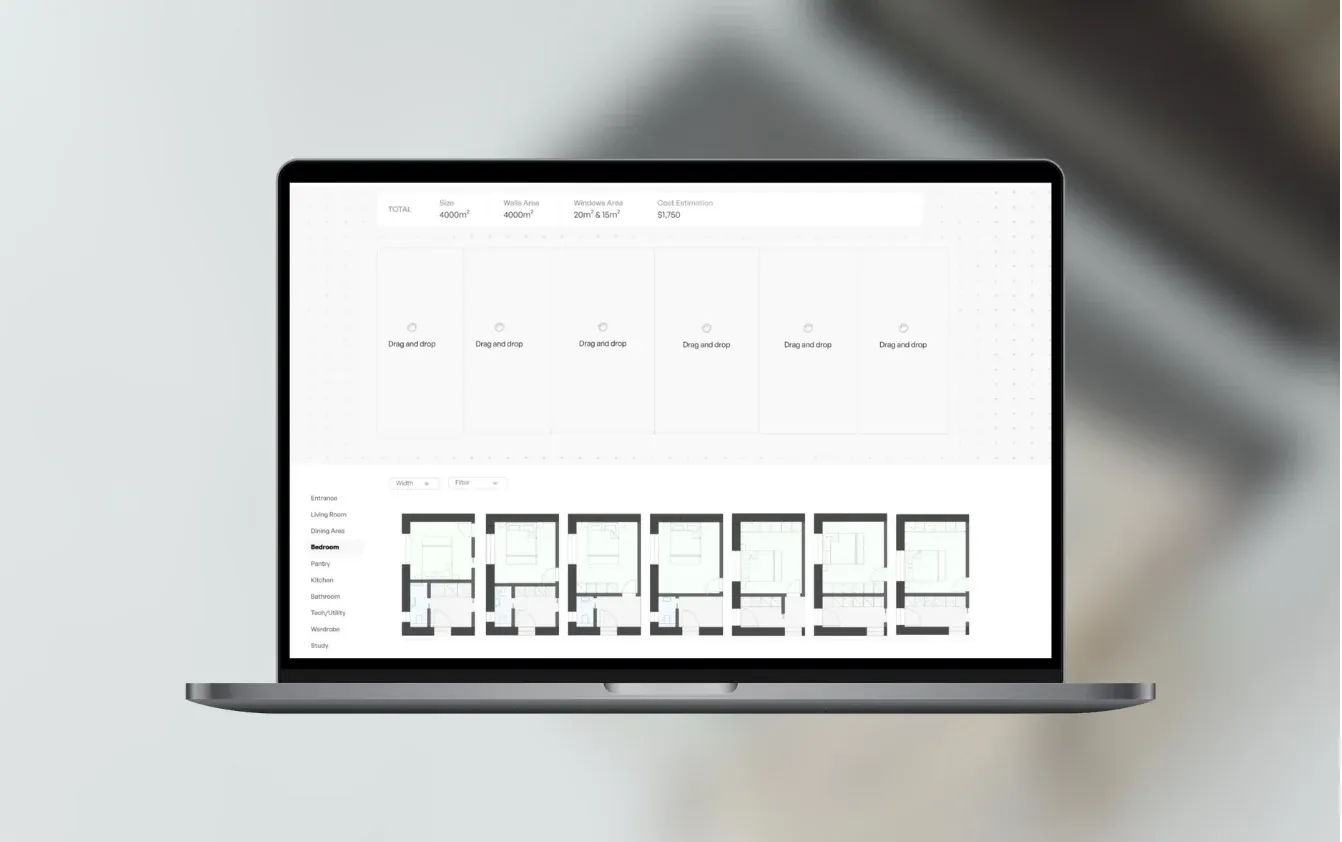
    Most of the work in a configurator isn’t the floor plan on screen. It’s writing down the rules, such as which modules connect, what is structurally possible and what each choice costs. For Planodu, the admin system for modules and their details mattered as much as the builder clients see.

  • 02

    Don’t rebuild your CAD or BIM tool.

    Revit, Archicad and similar tools do the design work, and replacing them makes no sense. The useful software sits around them, sharing exports with clients, tracking versions and approvals, and managing project documents. Start with exported files; direct connections to design tools are possible but cost more.

  • 03

    Show prices only if you can stand behind them.

    Clients like seeing the price change as they configure. If the number is wrong, it turns into a negotiation. Start with price ranges or “from” prices and tighten them as your cost data improves.

  • 04

    AI helps with the words, not the design decisions.

    AI is useful for meeting notes, change lists, project descriptions and searching past projects and specifications. It shouldn’t check structural safety, fire safety or building regulations. Those stay with qualified people.

What we can build.

  • Client-facing tools

    • Configurators and floor-plan builders
    • Side-by-side comparison of options and prices
    • Client portal for drawings, comments and approvals
    • Inquiry, deposit and payment flows
  • Studio operations

    • Projects with phases, tasks and deadlines
    • Documents and drawing versions in one place
    • Time recorded per project and phase
    • Overview of workload and upcoming deadlines
  • Design data

    • Admin tools for modules, components and their details
    • Rules for what fits together and what it costs
    • Product and material libraries
    • Exports for quotes, suppliers or production
  • AI and integrations

    • Change lists and meeting notes drafted from comments
    • Search across past projects and specifications
    • Payments through providers such as Stripe
    • Connections to accounting and CRM tools

Email and shared drives, project software or a custom tool?

For running studio projects, good off-the-shelf software is often enough. Custom software earns its cost when it becomes part of what you sell, like a configurator, or when your process doesn’t fit standard tools.

Email and shared drivesProject management softwareCustom tool
Project phases and deadlines No Yes Yes
Client approvals tied to a drawing version No Partly Yes
Configurator with your design rules No No Yes
Prices from your own cost data No No Yes
Cost to start None Monthly fee per user One-off build price
Ready to use Today Days 6 weeks to 3 months
Many studios combine the two. A standard tool runs internal projects, and a custom configurator or client portal covers the part clients see.

Projects like this.

What we’ve built for clients in this field.

  • Configurator

    Planodu

    Passive-home configurator · Europe

    The problem

    The team needed a digital product that turns a modular home offering into an interactive planning experience.

    What we built

    • Interactive floor-plan builder
    • Admin tools for modules and their details
    • Customer-facing configurator flow
    • Integrated payments

    What changed: A configurator where customers explore modular homes and create their own floor plan.

How the first version comes together.

A typical timeline. We confirm yours after the project workshop.

  1. Week 1

    Project workshop

    We go through your design rules, products and the decisions clients find hardest, then agree a fixed price for a first version.

  2. Weeks 2–3

    Rules and data

    Modules, components, options and prices set up in an admin tool your team can update without us.

  3. Weeks 4–7

    Configurator or portal

    The part clients use, shown in a working demo every week and tested with a few real clients.

  4. Launch

    Live with clients

    Payments or inquiries switched on. You own the code, repositories and accounts.

  5. Then

    More products and phases

    New product lines, more options and studio tools, added in 2-week stages.

Our past projects reached a first version in 6 weeks to 3 months. The rules take longer than the screens, so the sooner you write them down, the faster it goes.

Case studies.

Systems we’ve built that are close to this one.

  • Planodu

    Construction Intelligence · Bratislava, Slovakia

    Interactive floor plan builder

    Platform that allows users to create floor plans for their passive homes.

    Read the case study
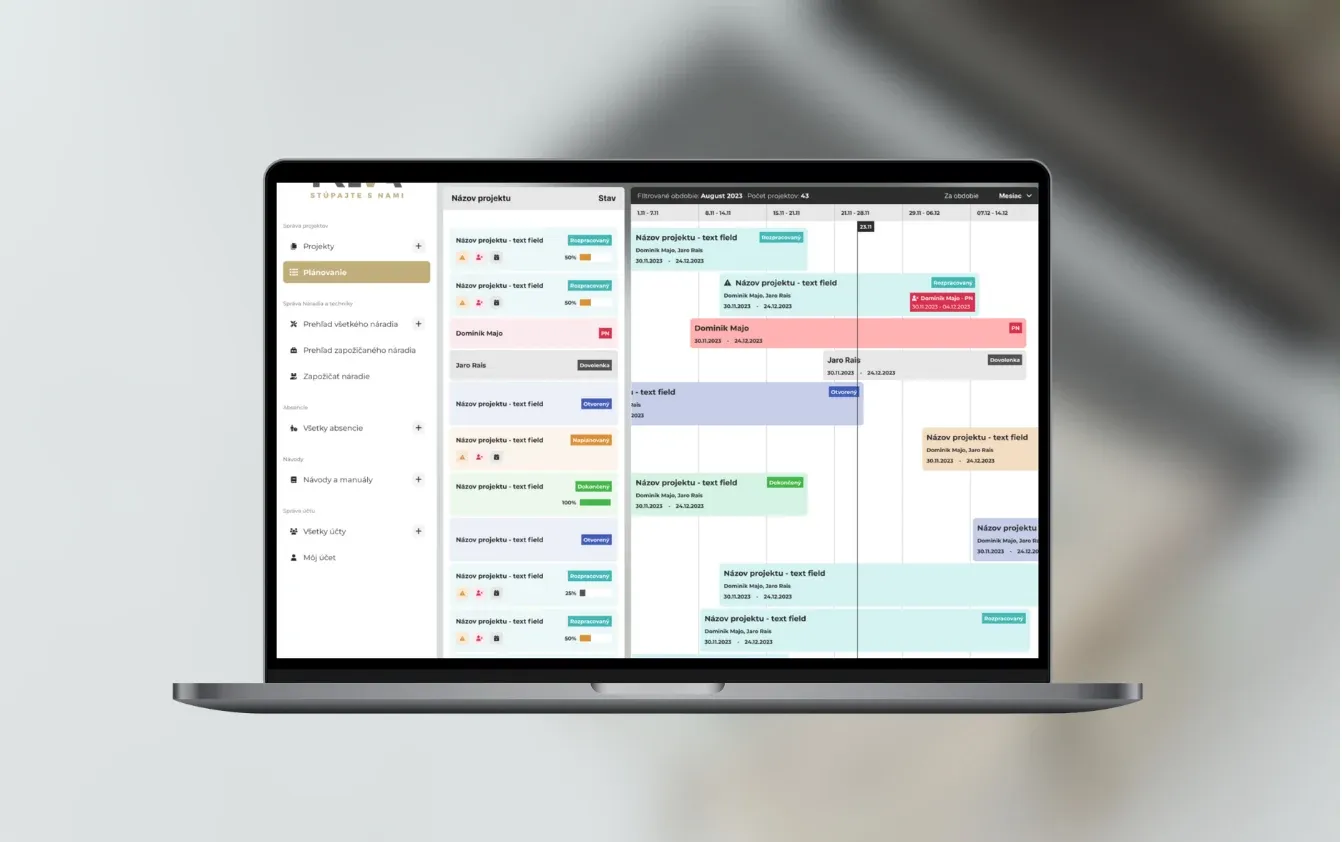
  • Treva

    Construction · Bratislava, Slovakia

    Managing construction projects

    A construction project platform combining progress dashboards, assigned tasks, documents and team collaboration.

    Read the case study

Questions people ask.

Is this mainly for smaller studios?

No, but small and growing studios often gain the most, because the same people design, meet clients and run the office. A first version can focus on one product line or one type of project.

What does a configurator cost?

A simple option configurator connected to one or two systems can fit our €5–10k range. An interactive floor-plan builder with an admin system, prices and payments, or a client portal with project tracking, is typically €10–30k. We fix the price after the project workshop.

How long does it take?

Our past projects reached a first version in 6 weeks to 3 months. Defining the design rules often takes longer than building the screens, so studios that already have them written down move fastest.

Can it work with Revit, Archicad or AutoCAD?

Usually through the files they export, such as PDFs, images or IFC models. Deeper connections through their programming interfaces are possible but cost more. We check in the workshop whether they’re worth it for you.

Can clients pay or leave a deposit through it?

Yes. Planodu takes payments through Stripe, and the same approach works for deposits, paid consultations or ordering a configured design. Your team gets the order with everything the client chose.

Can we update options and prices ourselves?

Yes. That’s what the admin system is for. Your team adds modules, changes prices and retires options without calling a developer.

Where does AI fit in a design studio?

In the words around design, such as meeting notes, change lists from client comments, project descriptions and searching past projects or specifications. We don’t use AI to check structural safety or building regulations; qualified people do that.

Who owns the tool and the design data?

You do. The code, repositories and accounts belong to you, and so does every rule and component you set up. We fix bugs for free for 3 months after launch, then offer optional monthly support.

Would a configurator help your clients?

Show us the decisions your clients struggle with most. In 30 minutes we’ll tell you what a first tool could cover and roughly what it would cost.

JurajCEO, QikBuild

You leave the call with

  • What we would build first
  • A rough price range
  • Whether custom software makes sense for you
Book a 30-minute call

Or write to hello@qikbuild.com